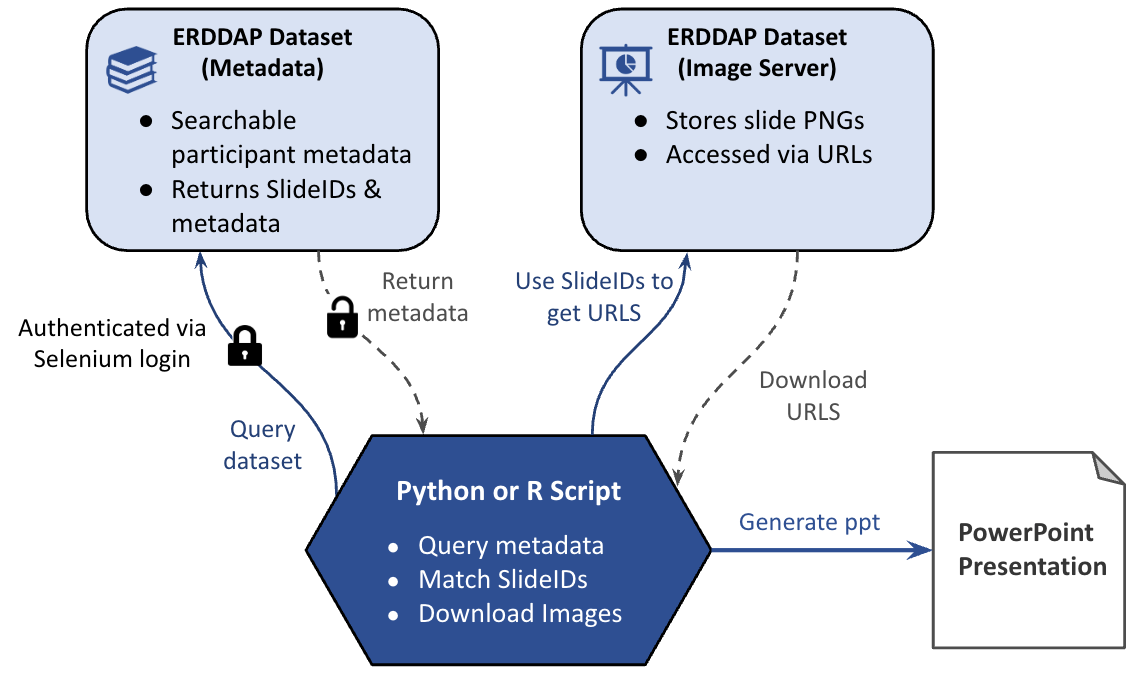
The workflow diagram illustrates how authenticated access, metadata querying, and file retrieval combine to generate an automated PowerPoint presentation from protected ERDDAP datasets. The process is identical in Python and R; only the implementation language differs.
Step 1: Accessing Password Protected Datasets
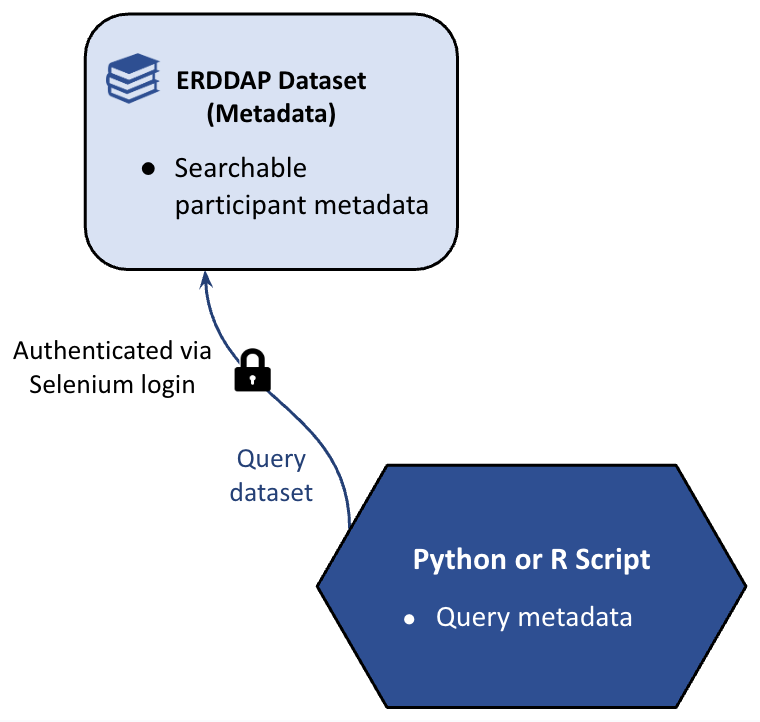
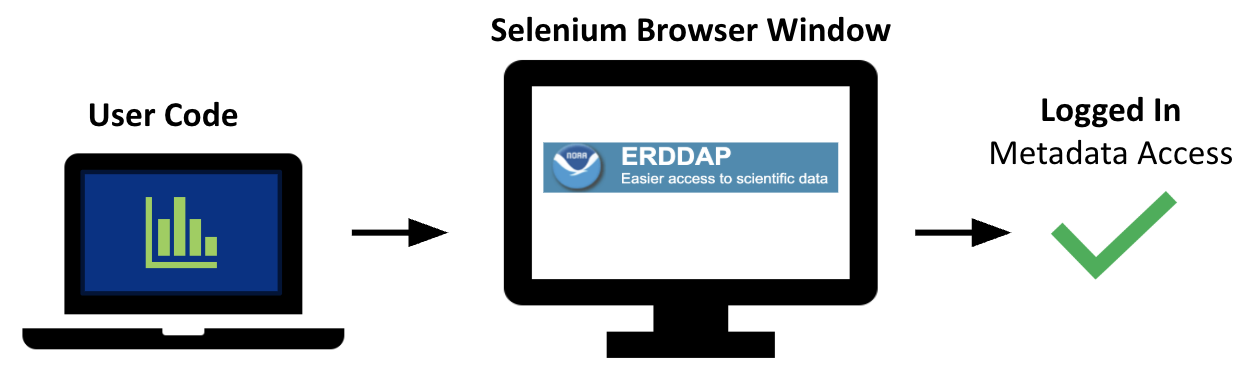
The workflow begins when the Python or R script initiates a secure login sequence using Selenium. Because the metadata dataset is password-protected and contains personally identifiable information (PII), access must occur through NOAA’s Google-based authentication system. The script launches a browser window, allowing the user to complete Google sign-in and two-factor authentication.
Once authentication is successful, the script extracts the active session cookies from the browser and transfers them into a programmatic HTTP session. This establishes an authenticated ERDDAP connection that can be used for subsequent API requests without storing credentials in the code.
With the secure session in place, the script constructs an ERDDAP tabledap query URL and applies user-defined search criteria (such as course, year, affiliation, or other metadata fields) to retrieve only the relevant records.
Selenium WebDriver: Automating Access to ERDDAP
Selenium WebDriver is used to automate the browser-based login required to access password-protected ERDDAP datasets. Because authentication is managed through NOAA’s Google identity system, direct API tokens are not used. Instead, the script launches a browser window and allows the user to complete the standard Google sign-in and two-factor authentication process.
Once login is successful, Selenium retrieves the authenticated session cookies from the browser and transfers them to the script’s HTTP session. This enables secure, programmatic access to restricted ERDDAP datasets without storing passwords in code.
Step 2: Retrieving Participant Metadata
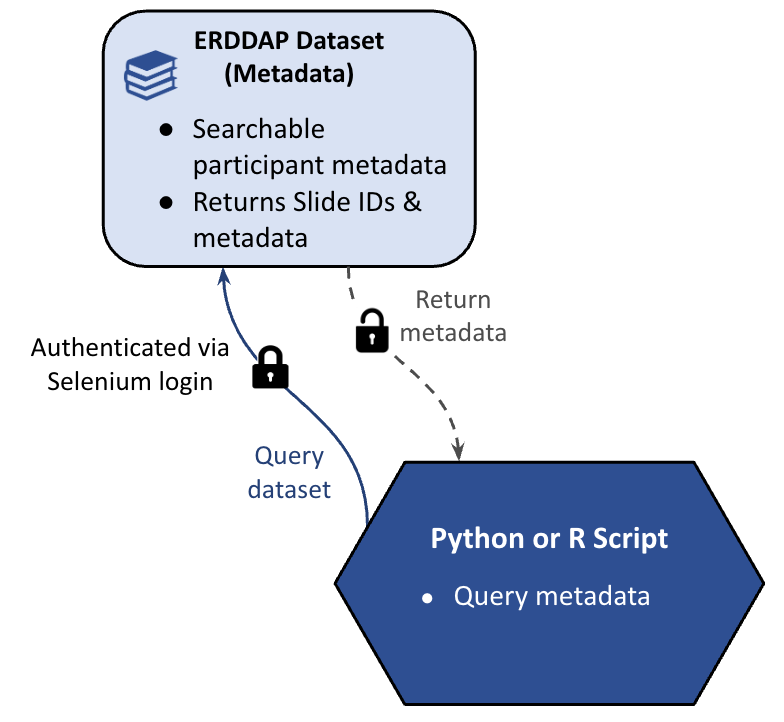
Once an authenticated ERDDAP session has been established, the script queries the metadata dataset to retrieve participant records that match user-defined search criteria. This query is executed through ERDDAP’s tabledap interface, which returns a structured CSV containing only the records relevant to the request.
The returned dataset includes participant metadata along with the corresponding Slide IDs. These Slide IDs are critical, as they act as the index for the next stage of the workflow, determining which slide images should be retrieved from the archive.
Step 3: Query Participant Slide PNGs
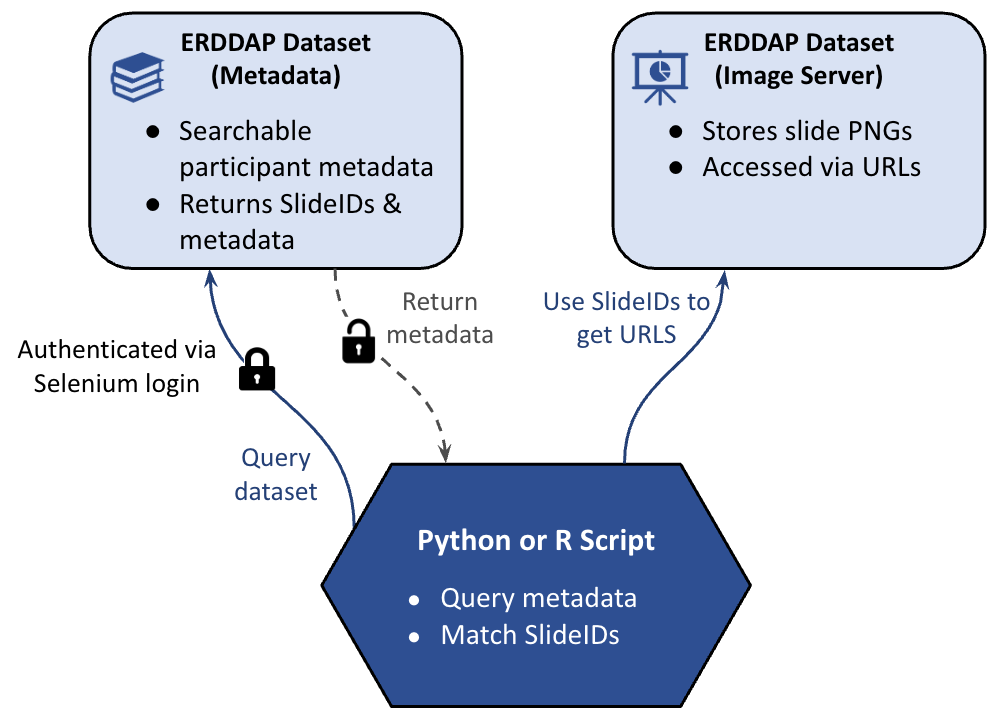
After retrieving the metadata table, the script uses the returned Slide IDs to determine which slide images correspond to the selected participants. Each Slide ID acts as a key that links the metadata dataset to the slide image dataset hosted in ERDDAP.
Using these identifiers, the script constructs ERDDAP file URLs for each matching slide. Because the image dataset is indexed through predictable file naming conventions, URLs can be generated programmatically and accessed through the authenticated session established earlier.
Step 4: Download Participant Slide PNGs
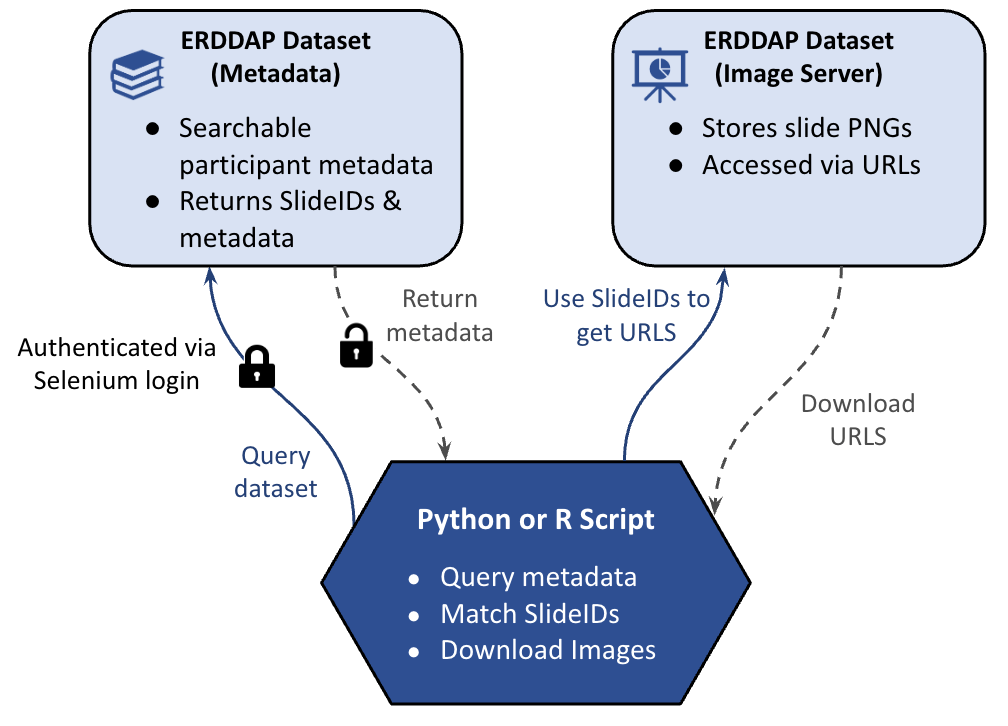
With the slide image URLs constructed, the script accesses the slide PNG files through the authenticated ERDDAP session. Because authentication was established earlier via Selenium, the script can securely retrieve protected image assets without additional login steps.
Each slide image is downloaded locally and prepared for inclusion in the final presentation. When multiple slides are requested, the script can optionally use parallel downloads to improve performance and reduce runtime.
Step 5: Generate Custom PowerPoint
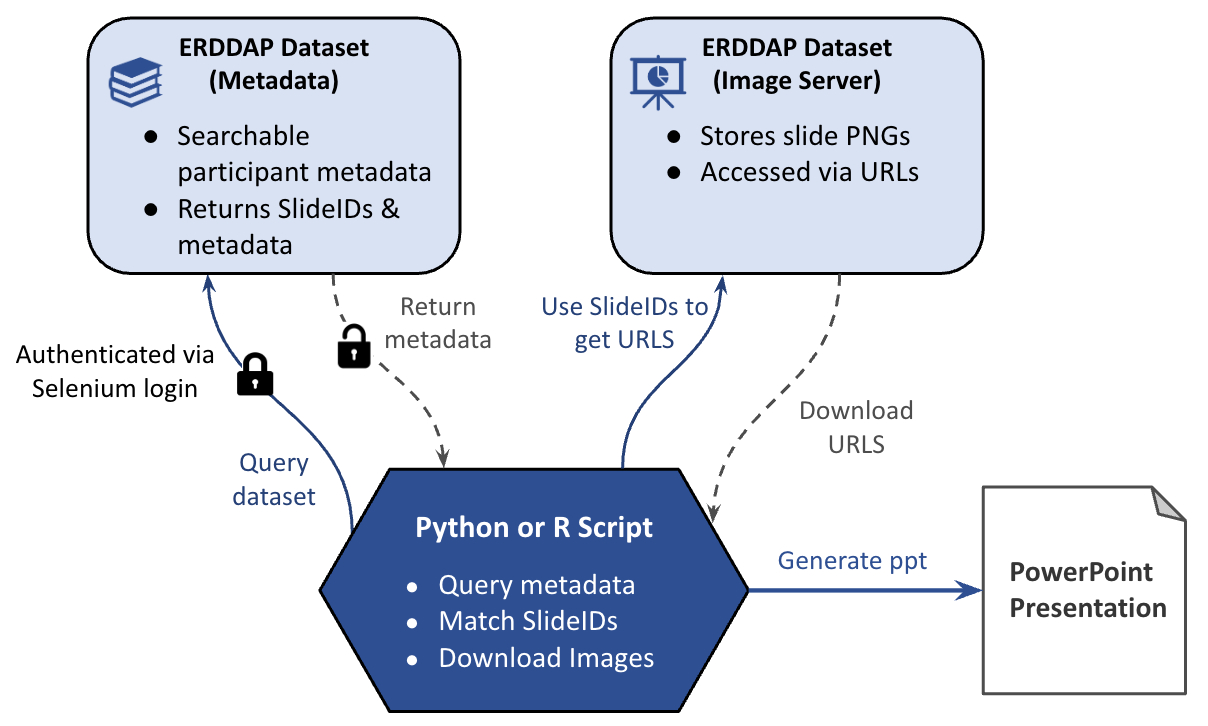
After the slide images have been downloaded, the script uses both the image files and the associated metadata to generate a formatted PowerPoint presentation. Each slide PNG becomes a new presentation slide, while metadata fields such as participant name, affiliation, course, or product usage are used to dynamically populate titles and annotations.
This ensures that the presentation reflects the original query criteria and maintains consistent formatting across slides. Because the workflow is fully automated, users can generate customized, presentation-ready outputs directly from ERDDAP without manually searching for files or editing slides.
End Product
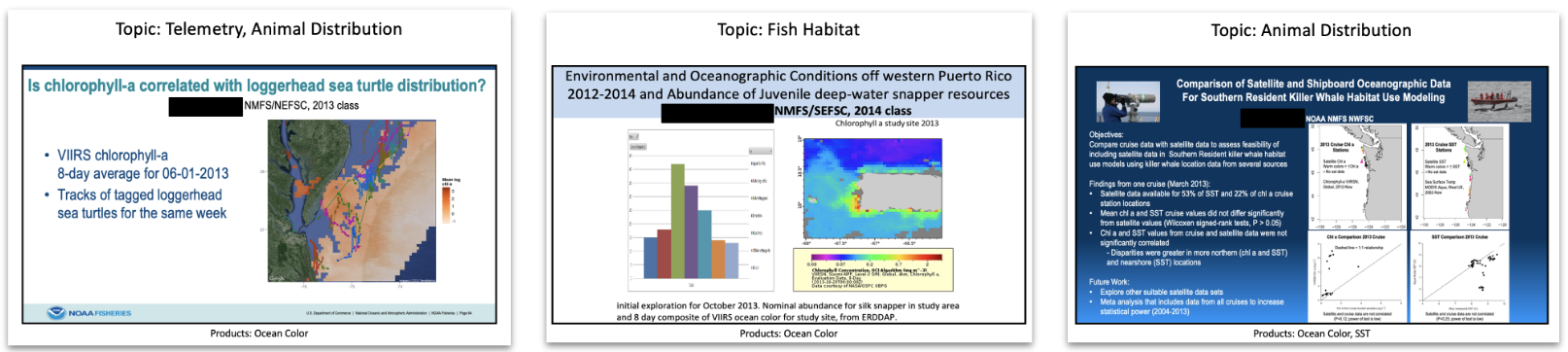
The final output of the workflow is a fully assembled PowerPoint presentation generated directly from the ERDDAP query. Each slide combines the downloaded participant image with the corresponding metadata fields, producing a structured and consistently formatted presentation tailored to the original search criteria.
What begins as a secure metadata query is transformed into a ready-to-use reporting product. By linking structured metadata with archived slide assets, the workflow enables users to move seamlessly from data discovery to presentation delivery without manual file searching or slide editing.
Strengths and Limitations of this ERDDAP Approach
This workflow leverages existing ERDDAP infrastructure to support secure, automated access to protected datasets without requiring new backend systems. By integrating Selenium with NOAA’s Google-based authentication, it maintains identity-managed security while avoiding the storage of passwords in code. The approach also demonstrates ERDDAP’s versatility, showing that it can function not only as a public data catalog, but as a structured metadata registry and controlled asset distribution platform.
However, there are important limitations to consider. Because the datasets contain personally identifiable information (PII), authentication must occur through a browser-based Selenium session, which requires user interaction during login. The workflow is also sensitive to changes in ERDDAP dataset configuration, such as renaming datasets or modifying file structures, which may require updates to the script.