CoastWatch West Code Node
  • Data Access
    • Data Catalog
    • Data Server
  • Tools and Training
    • Tools
    • Training
    • Code Gallery
  • Applications
  • About
    • CoastWatch
    • People
    • Contact Us
    • Customer Survey
    • News Archive

Automated Access to Password-Protected ERDDAP Datasets

Project Purpose

This project demonstrates a non-traditional use of ERDDAP: not just as a public data portal, but as a secure, searchable database and image server that can feed an end-to-end automation workflow. Authorized users can query participant metadata from NOAA CoastWatch satellite training courses, download the matching slide PNGs, and automatically assemble a custom PowerPoint deck, all while keeping personally identifiable information (PII) protected behind authentication.

Importantly, the tutorials associated with this project are designed so users can adapt this workflow to their own password-protected ERDDAP datasets, not just the CoastWatch example shown here.

Why this matters

ERDDAP is commonly used for open discovery and reuse (public datasets, anonymous access). But some datasets must be restricted, especially when they contain PII, internal reporting metrics, or unpublished materials.

This project serves as a blueprint for building secure, automated workflows. The same approach can be applied to managing archives, organizing image collections, and protecting preliminary data products. By combining identity-managed access with automated querying and file retrieval, users can securely manage and distribute protected resources without sacrificing efficiency. The project demonstrates that ERDDAP can function as far more than a public data catalog. It can operate as a data API, a structured metadata database, an image server, and a reporting backend, all within a secure role-based access framework.

ERDDAP used in nonconventional ways

1) ERDDAP as a searchable database

A password-protected tabledap dataset acts like a structured, queryable registry of participant information and slide IDs.

Instead of just serving environmental measurements, ERDDAP here functions as:

  • A relational-style metadata store
  • A searchable reporting backend
  • A structured index for downstream automation

2) ERDDAP as an image server

A second dataset indexes a folder of PNG slide files and exposes them through predictable URLs.

Once authenticated, scripts can:

  • Construct file URLs dynamically from Slide IDs
  • Retrieve slide PNGs directly
  • Batch-download content for automated reporting

This transforms ERDDAP from a “data API” into a controlled asset distribution system.

The CoastWatch Satellite Training Course Overview
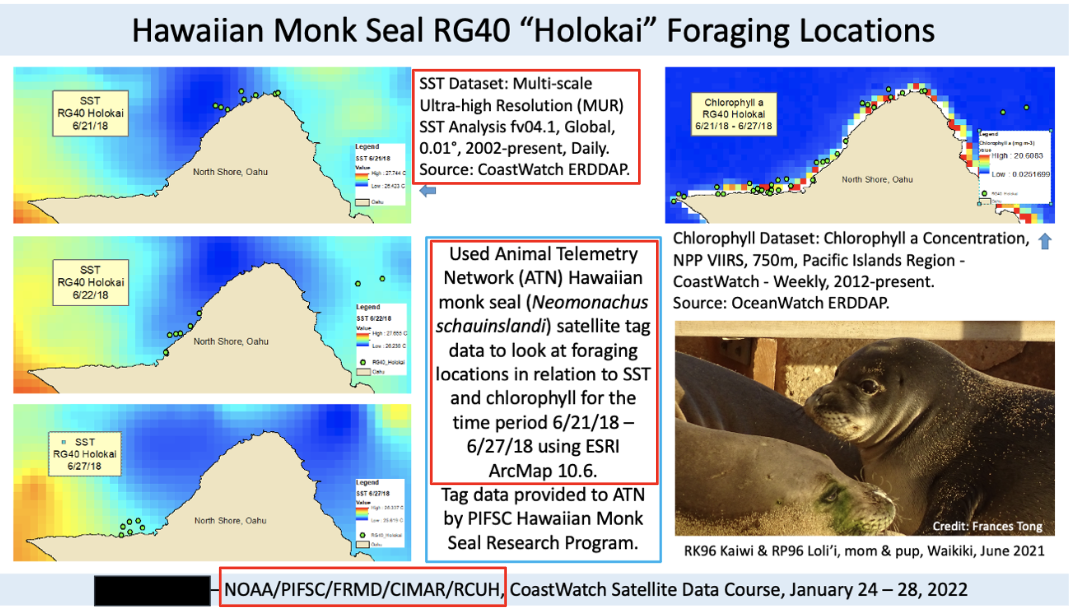
CoastWatch offers satellite data training workshops each year, during which participants are asked to submit a project summary slide at the conclusion of the course. These sides document how satellite data were used and capture important participant and project metadata. Because the slides include personally identifiable information (PII), access must be restricted. The goal of this project is to allow authorized users to generate presentations from these archived slides through a secure, automated workflow.

Over 250 participant slides have been collected since 2013 and the archive continues to grow.

Example participant project slide.

The CoastWatch Slide Archive Problem

Then

Before this project, participant slides were scattered across shared drives and folders, often with inconsistent naming conventions and organization. Discovering past projects required manual searching and institutional knowledge, making the process very time consuming. As the archive grew, it became increasingly difficult to retrieve examples from specific years, topics, or participants.
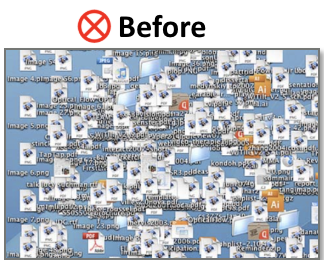
Now

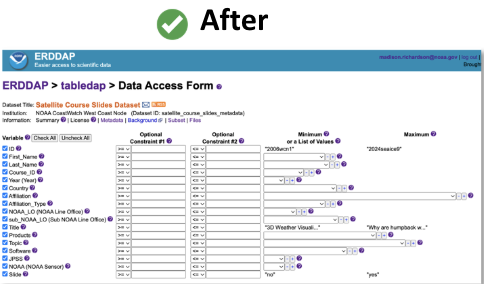
After this project, slides and associated metadata are hosted in ERDDAP, where they can be searched and filtered by course, year, affiliation, products, topics, software, and more. Each slide ID links structured metadata directly to its corresponding image file, allowing authorized users to retrieve participant work instantly. This supports documentation of course impact and the generation of presentation-ready materials through an automated workflow.
Server-Side Configuration of Datasets for Secure Access

How secure access is implemented

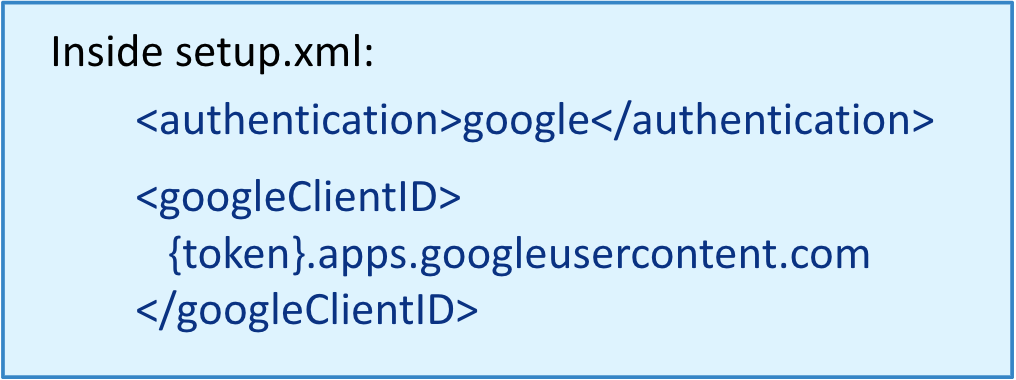
To secure access to restricted datasets, ERDDAP must first be configured to authenticate users. This configuration lives entirely in the server’s setup.xml file. By setting the authentication method to Google and providing a Google client ID, ERDDAP can authenticate users using NOAA-authorized Google accounts through OpenID Connect.
Who can access the datasets?

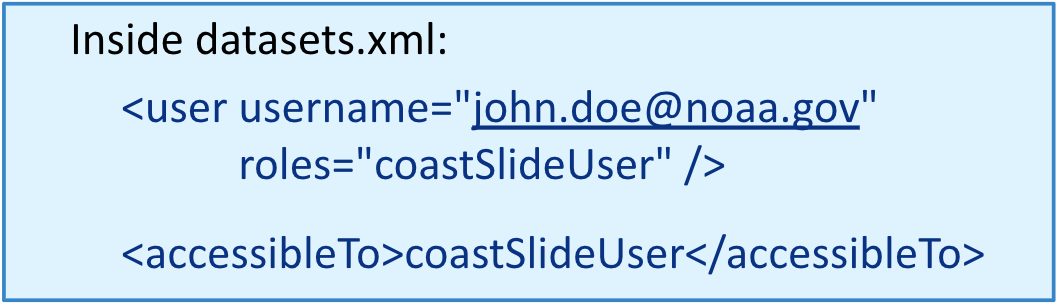
Once authentication is in place, the next step is authorization, deciding who can actually access specific datasets. In ERDDAP, this is handled through roles defined in datasets.xml. Authenticated users are assigned one or more roles, and datasets declare which roles are allowed to access them. In this project, users with the coastSlideUser role can query the private datasets, so our participant metadata and slide datasets, while all other users are denied access.
Where does the ERDDAP data come from

Participant metadata CSV

Participant information is stored in a structured CSV table that captures details from each each satellite training course. This includes fields such as course name, year, affiliation, products used, and a unique slide ID that links metadata to the corresponding presentation file. The table functions as a searchable index that connects participant information directly to archived slide images.

Participant Slide PNGs

The archive contains over 250 individual slide PNG files collected since 2013, each assigned a consistent identifier. Files follow a standardized naming convention:

[Year][Course][Number].png

This allows the slide images to be programmatically retrieved and linked to their associated metadata. This structure enables automated queries and efficient presentation generation.

How the ERDDAP Dataset XMLs Were Set Up

Participant Metadata Dataset

The participant metadata dataset is a searchable table that stores structured information about satellite training course participants. It is publised in ERDDAP under the dataset ID satellite_course_slides_metadata and is built using EDDTableFromAsciiFiles, with a local CSV file serving as the source. The table includes fields such as participant name, affiliation, course ID, products used, year, and the slide ID among others. Access to this dataset is restricted to authorized users assigned to the coastSlideUser role.

Slide Images Dataset

The slide image dataset provides a linked archive of participant slide PNG files. It is published in ERDDAP under the dataset ID course_slide_deck and is built using EDDTableFromFileNames, which automatically indexes files from a designated folder of slide images. ERDDAP extracts file-level metadata such as file name, URL, size, type, and modification date, making the archive searchable and programmatically accessible. Like the metadata table, access to this dataset is limited to users with the coastSlideUser role.

Fisheries STAR CoastWatch Southwest Fisheries Environmental Research Division
NOAA logo
Science. Service. Stewardship.
Protecting Your Privacy FOIA Information Quality Disclaimer Commerce.gov
© 2025 NOAA CoastWatch West Coast | Built with Quarto